Stop Pasting Prompts Into Claude Code Routines
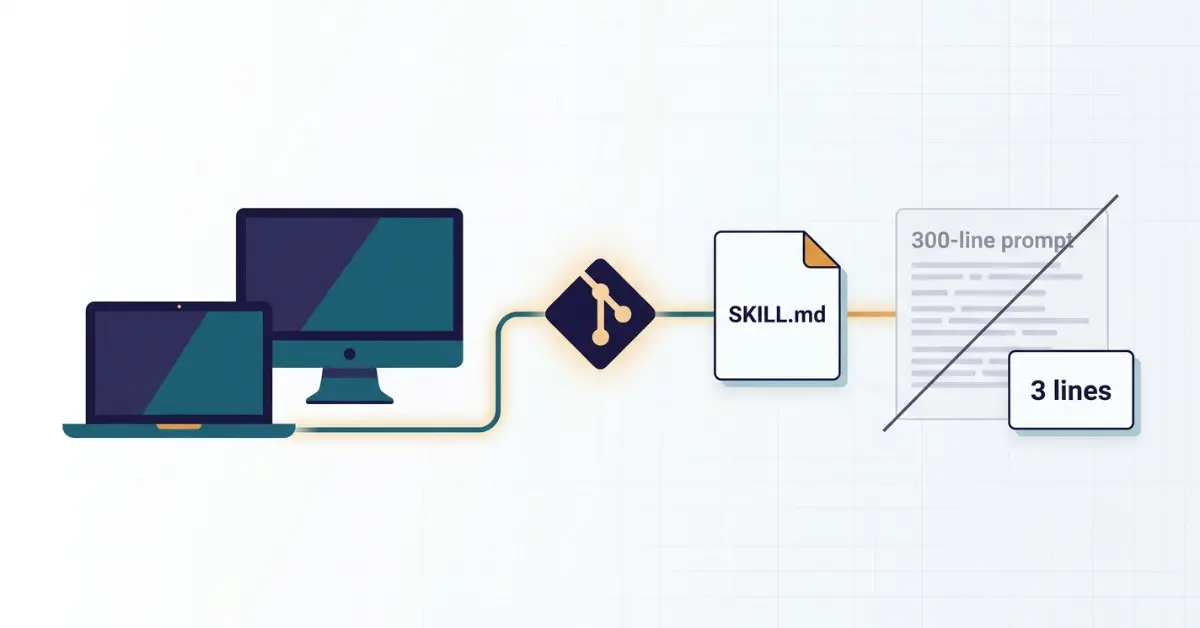
I run Claude Code across two computers. A desktop at my desk and a laptop for when I am travelling. For months, that split caused a small, recurring annoyance I never sat down to fix. This week I finally did, and the fix was simpler than the problem deserved.
If you run routines in Claude Code and you have ever felt a low-grade dread about keeping them in sync, this one is for you.
The setup that quietly was not working
I was running all my routines from a "master" prompt pasted directly into the routine settings. Hundreds of lines of instructions, living inside a UI text box.
It worked. That is the trap. It worked well enough that I never questioned it.
But here is what "working" actually looked like day to day. Every time I wanted to tweak the routine, I had to remember which of the two machines had the latest version, open the settings and hunt for the exact line to change, edit it in place inside a cramped field, then manually re-paste the whole thing on the other machine, and hope I actually remembered to do that last step.
That last one is where it fell apart. More than once I made an improvement on my laptop, came back to my desktop a week later, and ran an older version of the same routine without realising it. No error. No warning. Just a slightly worse result and a nagging sense that something was off.
I had, you could say, a syncing feeling I was doing it wrong.
The fix: move the instructions out of the prompt and into a skill
Here is what I figured out. Do not keep your routine instructions in the prompt at all.
Instead, do three things. First, put the instructions in a skill, which is just a folder with a SKILL.md file that holds your instructions. Second, commit that skill to your Git repository (mine live on GitHub). Third, point the routine at the skill so it loads and runs from the repo instead of from a pasted block of text.
Your routine prompt collapses from 300 lines to about 3. It stops being a wall of instructions and becomes a pointer that says, in effect, load the skill from this repo and follow it.
The instructions now live in one file, in one place, versioned like everything else in your project.
Why this works so well with routines specifically
This is the part that clicked for me once I understood how routines actually run under the hood.
A Claude Code routine does not run against your local files sitting on whichever laptop you happen to be using. Each run starts from a fresh clone of the repository you attached to it, and it has access to any skills committed inside that repository. That is the whole game.
Think about what that means. A pasted prompt lives only in the routine's settings. It is the one piece of the setup that does not travel with your code. But a skill committed to the repo gets cloned fresh on every single run, automatically, on whatever machine or cloud session the routine fires from. You are no longer fighting the sync problem. You have removed the thing that was out of sync in the first place.
This is also why Anthropic's own guidance points the same direction: if you do something more than once, turn it into a skill checked into your repository rather than a block of text you maintain by hand. It is the same principle behind keeping reusable context in one place rather than re-explaining it every session, which I covered when comparing Claude Chat, Cowork, and Projects for SEO work.
The four concrete wins
Beyond the routine-specific reason above, four practical things change, and each solves a real problem I was living with.
1. The skill travels with your code
A project skill lives in your repository under a skills folder. When I pull the repo on my laptop, the routine's brain comes with it. No copy-pasting between machines. No "which one is current" guessing game. The repo is the single source of truth.
2. Every change is versioned
Because the skill is a file in Git, every edit is a commit. You can see exactly what changed, when, and if you write decent commit messages, why. If a change makes the routine behave worse, you revert and you are back to the known-good version in seconds. A prompt in a settings box has no history, no diff, and no undo. Once you overwrite it, the old version is simply gone.
3. One place to maintain
When I improve the routine now, I edit one file. Not a setting on machine A, then the same setting on machine B. Not a pasted block I have to locate and scroll through first. One file, one commit, done.
4. Your context stays lean, and this matters more than it looks
There is a real technical reason to prefer skills over an always-loaded block of instructions. A file that is always loaded, like a large CLAUDE.md, sits in context on every interaction. A skill is only loaded when it is actually needed, costing very little until the moment it becomes relevant. That is why you can have many skills installed without slowing anything down, while a bloated always-on prompt drags on everything. Moving your routine into a skill keeps it out of the way until it is time to run it.
How the routine actually finds the skill
One point worth getting precise, because it is easy to describe loosely. When people say the routine "calls" the skill, here is the real mechanism.
Claude Code loads a skill in one of two ways. Automatically, when your request matches what the skill is for, or directly, when you invoke it by name. The SKILL.md file starts with a short piece of frontmatter, a name and a description, and that description is what tells Claude when the skill applies.
That description field is not documentation. It is the trigger. A vague description is the single most common reason a skill quietly never fires when you expect it to. So when you write yours, be specific about when the skill should run, not just what it does.
Your thin routine prompt, then, is really doing one job: making sure the right skill gets loaded at the right moment. The depth lives in the skill file.
How to set this up yourself
If you want to move one of your own routines over, here is the shape of it. Start with a single routine rather than migrating everything at once. Get one working end to end, then repeat the pattern.
Step 1: Create the skill folder in your project
Inside your repo, add a skills directory (the .claude/skills path), and inside that, a folder for your skill. Put a SKILL.md file at the root of that folder. A common reason a skill will not load is SKILL.md sitting in the wrong place. It needs to be at the root of the skill's own folder.
Step 2: Write the SKILL.md
Start with frontmatter, then paste your existing routine instructions underneath.
markdown
---
name: my-routine
description: [Be specific about WHEN this should run. This is the trigger, not a label.]
---

# My Routine

[Your actual routine instructions go here,
the 300 lines that used to live in the settings box]
Step 3: Commit and push
Now the skill is versioned and it travels with the repo.
bash
git add .claude/skills/
git commit -m "Move routine into a skill for versioning and cross-machine sync"
git push
Step 4: Slim down the routine prompt
Replace the giant pasted block with a short instruction that points at the skill. Roughly: load and run the my-routine skill from this repository.
Step 5: Test it on both machines, or trigger it and check the run
Since a routine clones the repo fresh, run it once manually before you rely on the schedule and confirm the output matches what you expect. If you also use the skill locally on a second machine, pull the repo there and verify it behaves identically. This is the moment your syncing problem is supposed to disappear. Verify that it did.
A couple of things worth knowing going in. Adding or editing a skill inside an existing skills folder is picked up within your current session without a restart, but creating a brand-new top-level skills directory that did not exist when the session started needs a restart so Claude Code can watch it. And if a skill is not firing, the description is the first thing to check. Make it more specific about the triggering situation.
Why bother, honestly
If you run Claude Code on exactly one machine and never touch your routines, a pasted prompt is fine. I will not pretend otherwise. The pain I am describing scales with how often you edit and how many places you have to keep in sync.
But the moment you add a second machine, or start iterating on a routine regularly, or want to be able to undo a change that made things worse, the pasted prompt stops being simple and starts being a liability you maintain by hand. And because routines clone your repo fresh on every run, a committed skill is exactly the kind of thing they are built to pick up.
Moving it into a skill turns your routine from a fragile copy you babysit across devices into a versioned file that lives with your code and loads only when it is needed. One source of truth. Full history. Lean context.
That syncing feeling went away the moment I stopped pasting and started committing.
If you are building out more of your Claude workflow, the same one-source-of-truth thinking applies well beyond routines. It is the backbone of how I run Claude for a full SEO audit without re-explaining my site every time.
Frequently Asked Questions



Leave a Comment
Your email address will not be published. Comments are moderated before appearing.