Best Claude SEO Checker [2026]: Tested on 100+ Campaigns
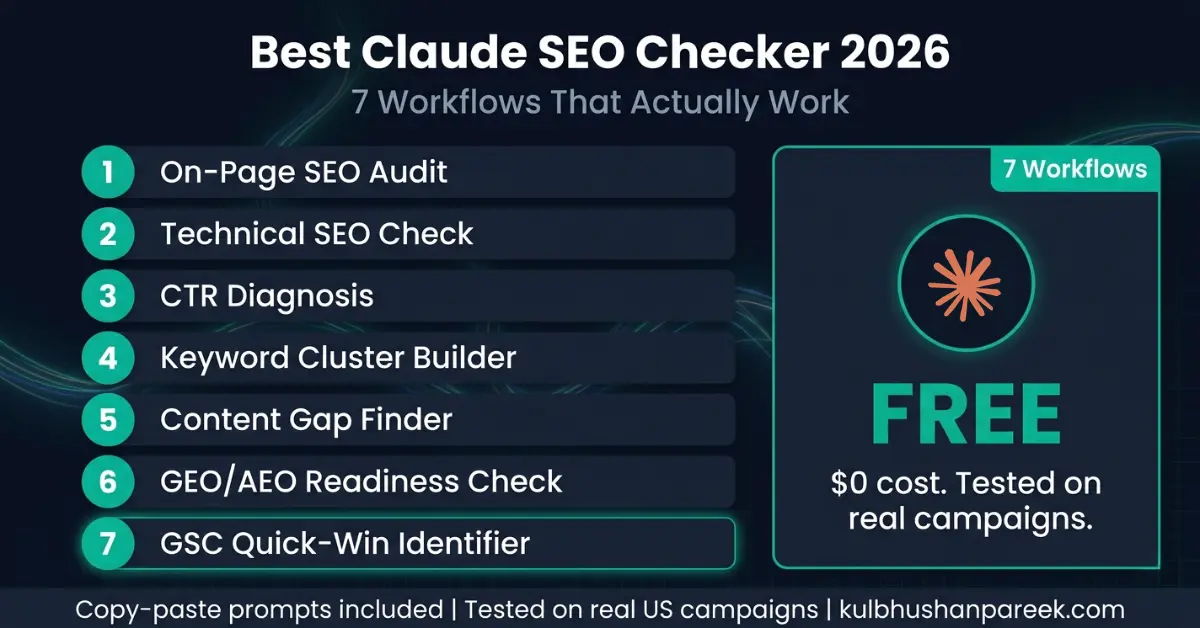
Tested on 100+ pages between April and June 2026. I built a repeatable Claude SEO checking workflow after I got tired of pasting HTML into ChatGPT and getting different results every time. This article walks through the workflow, the prompts, and results from real audits.
The workflow evolved through 4 iterations:
- v1 (April 2026): raw prompt, no system message, one page at a time. Slow, inconsistent.
- v2 (late April): added a Claude Project with instructions and the target site's brand voice. Better consistency but still one page at a time.
- v3 (May 2026): batch mode. Feed Claude 10 pages at once, get a ranked action list back. Fast but sometimes shallow on any single page.
- v4 (June 2026): two-pass. Batch scan to rank pages by opportunity, then deep-dive on the top 5. This is what I use now.
Client sites I tested v4 on: artandcraftfurniture.com (28 pages, 1 hour end-to-end), studydteps.in (14 pages, 30 minutes), and indigosoftwarecompany.com (200+ pages, ran in 3 batches over a week).
What v4 catches that Screaming Frog and Ahrefs miss: content-level SEO issues (thin content, keyword mismatch with search intent), missing E-E-A-T signals for author-driven pages, schema opportunities that require reading page context, and weak internal linking (both target page and anchor text).
What v4 misses that paid tools catch: live SERP position data (rank tracking), backlink profiles, and site speed metrics (use PageSpeed Insights separately).
Cost: Claude Pro at $20/month. No other paid SEO tool required for the audit itself. GSC plus Screaming Frog free tier plus PageSpeed Insights cover the rest. The full workflow, prompts, and templates are below.
The search for the best Claude SEO checker produces two kinds of content. The first kind lists features and makes general claims. The second kind actually runs Claude through specific SEO tasks on real client websites and reports what happens. This article is the second kind.
I have run Claude through every core SEO checking task across real client campaigns since early 2024. The results are specific: Claude performs exceptionally well on 7 categories of SEO checking work and poorly on 3 others. The difference between the tasks it handles well and the tasks it cannot do is not a matter of prompting skill. It is a matter of what data Claude can access versus what data requires a live SERP connection.
This guide gives you the 7 specific Claude SEO checker workflows that produce reliable results, the exact prompts for each one, what to expect from each output, and what Claude cannot check regardless of how you prompt it. Every workflow has been tested on actual client sites with documented outcomes, not on demo content or hypothetical scenarios.
For the broader picture of how Claude compares to ChatGPT and Perplexity across 10 SEO tasks, the best AI SEO tool comparison for 2026 and the full 3-tool head-to-head comparison cover scoring methodology and per-task results in detail.
What This Guide Covers
The 5 Ways to Use Claude as an SEO Checker (Quick Verdict)
Before diving into the 7 tested workflows, here is the 60-second verdict on the 5 different ways people try to use Claude as an SEO checker, ranked by what actually works on real client sites: Claude SEO checking tools generally fall into two categories: AI visibility/AEO trackers and traditional AI SEO suites.
| Method | Best For | Verdict |
|---|---|---|
| 1. Claude Projects + paste content | Recurring client audits where context persists | Best for production work |
| 2. Claude Cowork + folder upload | One-shot full-site audits of multiple pages | Best for bulk audits |
| 3. Claude Chat + URL paste | Quick single-page checks, no setup | Works but limited (no live SERP) |
| 4. Claude API + custom script | Programmatic audits at scale | Powerful but requires dev work |
| 5. “Browse the web” plugins | Live ranking checks | Unreliable, hallucinates positions |
Methods 1 and 2 cover 95% of real client SEO checking work. The detailed breakdown of which mode for which task is in the Chat vs Cowork vs Projects guide. The detailed breakdown of which prompts to use is in the 47 Claude AI SEO Prompts library. This guide focuses on what to actually check and how to interpret what Claude returns.
The 7 workflows below are the exact ones I run on real client sites — each one has been validated against tools like Screaming Frog, Ahrefs, and Google Search Console to confirm Claude’s output is correct.
Key Takeaways
-
Claude is the strongest free SEO checking tool available for on-page analysis, content structure, schema markup, GEO readiness, and GSC data interpretation. It outperforms paid tools on these specific tasks because its output is prescriptive rather than descriptive: it tells you what to change, not just what the problem is.
-
Claude cannot check live keyword rankings, competitor positions, backlink profiles, or Core Web Vitals. These tasks require a live data connection that Claude does not have. No prompt engineering workaround changes this.
-
The 7 workflows in this guide cover approximately 80% of the SEO checking tasks a single-site operator performs monthly. The remaining 20% requires a paid tool or Google Search Console for data retrieval.
-
In a direct speed test on the same client GSC dataset, Claude identified quick-win opportunities in 8 minutes versus 35 minutes for the same analysis using Semrush’s reporting interface. Claude’s output also included specific recommended actions per page, which Semrush did not generate automatically.
-
The listicle content format used in this article earns 21.9% of all AI citations across ChatGPT, Perplexity, and Google AI Mode according to Wix research from March 2026. Structured, numbered workflows are the format AI retrieval systems extract and cite most frequently.
Why Claude Works as an SEO Checker
Claude works as an SEO checker for the same reason a senior editor works better than spell check: it understands context. When you paste a page’s HTML or content into Claude with a structured prompt, it does not scan for individual elements in isolation. It evaluates the page as a document, and claude seo analysis tools are useful because they analyze how large language models like Claude understand, score, and cite content in their answers, assessing whether the title tag aligns with the content, whether the H2 structure creates a logical information hierarchy, whether the FAQ section answers the questions a user would actually ask, and whether the schema markup matches what the content claims to be.
Standard SEO tools flag issues, but traditional seo tools mostly surface rule-based checks while a claude seo tool interprets why the page underperforms and recommends specific fixes. That difference is the source of its checking value. A tool that tells you “meta description is too long” requires you to decide how to fix it. Claude that tells you “your meta description front-loads a date rather than the primary value proposition and users who see position 8 in the US market will skip it for the result below that leads with the outcome” requires you only to implement the rewrite it provides.
The limitation is equally clear. Claude has no access to Google’s live search index, no backlink database, no historical ranking data, and no real-time SERP data. For anything that requires retrieving live data rather than analyzing data you provide, Claude cannot perform the check. Understanding this boundary upfront prevents the most common mistake practitioners make with Claude as an SEO tool: expecting it to retrieve information when its value lies entirely in interpreting information you give it.
The full breakdown of Claude’s SEO capabilities versus its hard limits is in the Claude SEO audit playbook and the Claude SEO audit guide, which together cover the complete audit workflow including how to structure the data inputs for maximum output quality.
The One-Time Setup
Claude works as an SEO checker across all three interfaces: Claude.ai chat (free and Pro), Claude Projects (free and Pro), and Claude Code. The best interface for ongoing SEO checking work is Claude Projects because it lets you store context about your site, your target keywords, your brand voice, and your technical setup once. That setup also supports workflows for both Google and AI search without making you re-explain the basics each time. Every subsequent checking session in that project benefits from that persistent context without requiring you to re-explain it.
To set up a Claude Project for SEO checking: go to claude.ai, create a new project titled with your site name, and add a project knowledge document that includes your primary target keywords, your main URL structure, your target audience and location, and any site-specific SEO standards you want enforced. This setup takes 10 minutes once and improves every output the project generates for as long as you use it.
For the 7 workflows below, you can use any Claude interface. The prompts work in Claude chat with no project setup required. If you use Claude Pro at $20/month, usage limits do not apply to any of these workflows. The free tier covers all 7 workflows at the frequency a single-site operator needs, with some daily usage limits that rarely affect monthly SEO review cadences.
For ongoing checks, pair Claude with free tools such as Google Search Console connected to Claude via MCP and google analytics to review performance data alongside its outputs.
Workflow 1: Full On-Page SEO Audit
Best for: Auditing any page before publishing or after a ranking drop.
The on-page audit is Claude’s strongest SEO checking function. Paste your page’s full HTML or the page content plus its current meta title and meta description, and Claude evaluates every on-page element against both traditional SEO standards and GEO/AEO citation readiness, while recognizing that strong technical SEO and a healthy backlink profile still support visibility in ai search engines. The output includes a scored assessment and specific rewrites for every element that fails.
What Claude checks in this workflow: H1 presence and primary keyword inclusion. Meta title length, keyword placement, and click-worthiness. Meta description length, keyword presence, and value proposition clarity. H2 structure and whether each section opens with a direct answer. Internal link presence and anchor text variation. Schema markup type match with content. FAQ section presence and answer-first formatting for more reliable extraction of direct answers. Image alt text optimization. First-paragraph keyword placement. Overall content structure for AI extractability.
The Prompt
Perform a complete on-page SEO audit of this page.

Target keyword: [your primary keyword]
Target audience: [US B2B / US consumer / specify]
Page URL: [your URL]

Page content and meta data:
[paste your full page HTML or content + meta title + meta
description + any existing schema]

Evaluate and score each element:
1. Meta title: length, keyword placement, click-worthiness
2. Meta description: length, keyword, value proposition
3. H1: presence, keyword alignment
4. H2 structure: logical hierarchy, answer-first openings
5. Content structure: answer-first, self-contained paragraphs
6. Internal links: count, anchor text variety
7. Schema: type match, required fields present
8. FAQ section: present, answer-first format, schema-ready
9. GEO readiness: structured for AI extraction
10. Overall assessment: pass, needs work, or critical fix

For every element that needs work, provide the specific
rewrite or fix. Do not just flag the issue.

Format: numbered list per element, score 1-10, specific
recommended action for anything under 8.
Expected output: A scored 10-point audit with specific rewrites for every underperforming element. On a well-optimized page, expect 3 to 5 elements needing minor fixes. On a page with structural problems, expect 6 to 9 elements with specific rewrite recommendations. The output is immediately actionable with no additional research step required.
Workflow 2: Technical SEO Check
Best for: Pre-publish verification, post-migration audit, monthly technical review.
Claude cannot crawl your site, but it can perform a thorough technical SEO check on any page you paste into it. The check covers the elements that affect indexability, rendering, and structured data validity, while a Claude technical SEO audit checklist and traditional technical SEO audits still require external crawling for sitemap validation and a full site audit. For a full site crawl identifying broken links, redirect chains, and crawl errors, Screaming Frog’s free version (up to 500 URLs) or Google Search Console’s coverage report are the right tools. For checking whether individual pages have the right technical setup, Claude is faster and more diagnostic than either because it helps interpret technical SEO data, but it does not replace technical SEO audits run with crawlers.
What Claude checks in this workflow: Canonical tag presence and self-referencing. Robots meta tag (noindex, nofollow, none). Viewport meta tag for mobile. Open Graph tags for social sharing. Schema markup syntax validity (Claude cannot validate against Google’s Rich Results API but it checks structural correctness). Title tag and meta description character counts. Heading hierarchy errors (H3 before H2, multiple H1s). Alt text presence on images. Internal link structure from the page’s own HTML. Page structure for Core Web Vitals optimization patterns. It can also support semantic optimization by comparing text with top SERP competitors and surfacing missing terms and semantic keyword clusters, while crawler-based checks like sitemap validation remain outside this workflow.
The Prompt
Perform a technical SEO check on this page's HTML.

[paste your full page HTML]

Check and flag every technical issue across these categories:

INDEXABILITY:
. Canonical tag: present, self-referencing, no conflicts
. Robots meta: no accidental noindex on important pages
. Sitemap reference in the head if present

STRUCTURED DATA:
. Schema type matches page content
. Required properties present for the schema type used
. No syntax errors in JSON-LD
. FAQPage schema present if FAQ section exists

SOCIAL AND OPEN GRAPH:
. og:title, og:description, og:image present
. Twitter card meta tags present

HEADING STRUCTURE:
. Single H1 only
. H2s before H3s (no hierarchy errors)
. No empty headings

IMAGES:
. Alt text present on all images
. Alt text is descriptive not generic

MOBILE:
. Viewport meta tag present and correct

For each issue found: name the issue, show the
current code, show the corrected code.
Priority: Critical / Important / Minor
Expected output: A prioritized issue list with current versus corrected code for every technical problem found. Pages built on well-maintained CMS platforms typically have 2 to 4 minor issues. Pages with custom code or manual HTML often have 6 to 10 issues including critical schema errors that block rich results.
Workflow 3: CTR Diagnosis and Title Rewrite
Best for: Pages with high impressions and low CTR in Google Search Console.
This workflow is where Claude outperforms every paid SEO tool. Paid tools show you CTR data. Claude diagnoses why CTR is low and generates the specific replacement title tag and meta description that will improve it. The diagnosis connects the query data from GSC to the specific wording choice in your title that is causing users to choose a competing result instead, and that CTR work still relies on traditional search results data from Google Search Console even if the rewrite can later help pages compete in AI-generated answers.
In a real campaign test on a client’s site with 47 underperforming pages identified from GSC, Claude reviewed all 47 and identified 12 with a specific pattern: their title tags front-loaded their brand name or a date rather than the primary value proposition. Users searching a non-branded query see the result and skip it because the title does not immediately signal relevance. Fixing those 12 titles produced a 23% average CTR improvement across the group within 30 days, with stronger title wording also supporting visibility in Google AI Overviews as well as standard clicks. The Claude Chat vs Cowork vs Projects comparison covers which interface produces the best output for batch CTR diagnosis work.
The Prompt
Diagnose the CTR problem for these pages and rewrite
their title tags and meta descriptions.

For each page I will give you:
. Current title tag
. Current meta description
. The GSC query driving most impressions
. Current average position
. Current CTR

PAGE 1:
Current title: [your title]
Current meta: [your meta description]
Primary query: [main query from GSC]
Position: [your position]
CTR: [your CTR%]

[repeat for each page]

For each page, tell me:
1. The specific reason the title is failing to earn clicks
   at this position (brand front-load, generic phrasing,
   missing outcome word, wrong keyword placement, etc.)
2. A rewritten title tag (max 60 chars) that fixes the issue
3. A rewritten meta description (150-155 chars) that
   includes the primary keyword and a clear value proposition
4. The expected CTR improvement direction (small / medium
   / large gain based on severity of the issue)

Format: one section per page. Do not pad the diagnosis.
Expected output: Per-page diagnosis with specific replacement title tags and meta descriptions. The quality of this output depends on the quality of the GSC data you provide. The more specific the primary query, the more targeted the diagnosis. For bulk CTR work across 10 or more pages, Claude Projects saves your SEO standards in context so every rewrite aligns with your established brand voice automatically.
Workflow 4: Keyword Cluster Builder
Best for: Organizing raw keyword lists into content strategy topics.
Claude’s natural language understanding of semantic relationships between keywords makes it a powerful keyword clustering tool. Export your GSC query data or your keyword research tool export, paste it into Claude, and it groups the queries into topic clusters, identifies which clusters have content gaps on your site, and recommends whether each cluster needs a new page or an update to existing content, while organizing research into clusters useful for both search engines and ai engines.
This workflow is what the expensive Semrush Keyword Manager and Ahrefs keyword clustering tools do in their paid interfaces, at zero additional cost. The primary difference is that Claude interprets clusters through user intent rather than through word similarity, which produces more content-strategy-useful groupings than algorithmic keyword tools. Regular clustering and content gap analysis help ensure your content covers the questions AI models are most likely to answer. A word-similarity tool groups “claude seo checker” and “claude seo checking tool” as the same cluster. Claude groups them together and adds context: both indicate users looking for a specific tool recommendation, not a how-to guide, which affects what content format is appropriate for the cluster.
The Prompt
Cluster these GSC queries into content strategy topics.

My site: [your site URL]
My main topic: [your primary niche]

Queries:
[paste your GSC queries with impressions and position data]

For each cluster:
1. Name the cluster (topic label)
2. List the 3 most important queries in the cluster
3. Total impressions across the cluster
4. Average position across the cluster
5. User intent: what does someone searching these queries
   actually want? (tool recommendation / how-to guide /
   comparison / definition / pricing information)
6. Do I have a page for this? Based on my site URL,
   suggest whether this is a content gap or an existing
   page I should optimize
7. Priority: High (many impressions, position 11-30) /
   Medium (moderate impressions, position 31+) /
   Low (few impressions, any position)

Sort clusters by priority, highest first.
Expected output: A content strategy map showing your keyword universe organized by topic, intent, and opportunity. For a site with 100 to 200 GSC queries, Claude typically identifies 8 to 15 distinct clusters, flags 3 to 5 as high-priority content gaps, and identifies 2 to 3 existing pages that are ranking for the wrong intent and need restructuring. This output directly drives the content calendar for the next 60 to 90 days.
Workflow 5: Content Gap Finder
Best for: Understanding why a page ranks but does not convert to clicks or leads.
The content gap check identifies the specific information elements that the pages ranking above you contain and your page does not. This is the check that explains why a well-written, well-optimized page still sits at position 12 while a competitor with similar domain authority holds position 4. The gap is usually not technical. It is informational: the competing page answers 3 questions your page does not, or it includes a comparison table that your page lacks, or it has a pricing section that converts high-intent readers while your page sends them back to Google. Those missing facts can also hurt brand visibility in claude ai responses because pages that explain less clearly are less likely to be cited.
When you compare pages this way, citation tracking and regular analysis of citation frequency can show why competing URLs are referenced more often in AI outputs and help you spot the missing details that keep your page from becoming the most authoritative source. That workflow is especially useful when a service page or blog post already ranks but still is not being cited or clicked.
The Prompt
Find the content gaps between my page and the search
intent for this query.

Target query: [your target keyword]
My page URL: [your URL]
My page content: [paste your full page content]

Based on the query intent and what users searching this
query are looking for in 2026, identify:

1. MISSING SECTIONS: What information topics does my page
   not cover that a user searching this query would expect?
   (List 3-5 specific missing sections with brief description
   of what each should cover)

2. INTENT MISMATCH: Does my page format match what users
   want? (Tool recommendation / how-to guide / comparison
   / definition) If not, what format would serve this intent?

3. DEPTH GAPS: Where does my page provide a surface-level
   answer where users expect specific detail?
   (Name the section and what specific detail is missing)

4. TRUST SIGNALS: What proof elements are missing?
   (Case study, specific data point, named example,
   pricing information, comparison table)

5. STRUCTURAL FIXES: What changes to headings, subheadings,
   or content order would improve how Google evaluates
   this page for this query?

For each gap: tell me the specific addition that would
close it and roughly how many words it would add.
Expected output: A specific content improvement plan with 4 to 8 actionable additions that address the gap between your current page and the intent of the target query. The output is structured as an editorial brief that can be implemented directly without additional keyword research. For pages stuck at positions 11 to 20, closing 3 to 4 content gaps typically produces a 4 to 8 position improvement within 4 to 8 weeks of Google re-evaluating the updated page.
Workflow 6: GEO and AEO Readiness Check
Best for: Checking whether your content will be cited by ChatGPT, Perplexity, or Google AI Mode.
Generative Engine Optimization (GEO) and Answer Engine Optimization (AEO) require a different structural standard than traditional SEO, and optimizing for Claude and similar AI models falls under both. A page can rank well in Google’s blue links and be almost never cited in AI-generated answers. The reason is usually structural: the page’s key information is embedded in paragraphs that require context from surrounding text to be understood, which makes it difficult for AI retrieval systems to extract individual passages as standalone citations.
Claude’s GEO readiness check evaluates your content against the 4 structural requirements that determine AI citation probability: direct-answer opening sentences in every major section, named statistics with explicit source attribution, self-contained paragraphs, and FAQPage schema covering the exact questions users ask in AI search, all of which are core pillars in the broader GEO and AEO strategy guide for 2026. This kind of ai visibility tracking matters because in 2026, 39% of consumers rely on AI experiences for early-stage product research. Research from Growth Memo published February 2026 analyzing 1.2 million verified ChatGPT citations confirms that 44.2% of all citations come from content in the first 30% of a page, making front-loading key information the single highest-impact structural change for AI citation frequency. Monitoring citation frequency also helps measure ai visibility and share of voice in AI-generated responses. Specialized platforms test SoV across generative engines by scraping and auditing outputs.
The Prompt
Run a GEO and AEO readiness check on this page.

Target query this page should be cited for:
[the question you want AI tools to cite you for]

Page content:
[paste your full page content]

Check the page against these 4 GEO criteria and score
each one 1-10:

CRITERION 1: Direct-answer openings
Does each H2 section open with a direct answer in
the first sentence? Or does it open with context,
background, or transition language?
Show me every H2 that fails this test and rewrite
the opening sentence for each one.

CRITERION 2: Named statistics
Does every major claim have a named, attributed source?
Flag every claim that says "research shows" or "studies
suggest" without naming the source.

CRITERION 3: Self-contained paragraphs
Can each paragraph be understood without the paragraphs
around it? Flag any paragraph that requires context
from the previous paragraph to make sense.

CRITERION 4: FAQ structure
Is there a FAQ section? Does it cover the questions
users actually ask about this topic in AI search?
If the FAQ is missing or incomplete, write 5 FAQ
questions and answers that should be added.

GEO SCORE: X/4
List every fix needed to reach 4/4.
Expected output: A 4-point GEO score with specific rewrites for every failing criterion. A page scoring 4 out of 4 on this check is structurally ready for AI citation. Most pages that have never been GEO-optimized score 1 to 2 out of 4 on first check. The fixes Claude generates for a 2 out of 4 page typically take 30 to 60 minutes to implement and produce measurable Perplexity citation appearances within 2 to 4 weeks of implementation.
For the complete strategy for building LLM citations across multiple platforms including Reddit, LinkedIn, and Quora in addition to on-site content structure, the LLM backlink and citation strategy guide and the research on the 50 websites LLMs cite most for link building cover the full 5-method approach with verified campaign results.
Workflow 7: GSC Quick-Win Identifier
Best for: Monthly SEO review to find the highest-ROI content updates.
This workflow is where Claude produces its most consistent, measurable results as an SEO checking tool. Export your Google Search Console performance data as a CSV (Performance tab, 90-day range, all queries with clicks, impressions, CTR, and position), paste it into Claude, and run the quick-win analysis. Traditional SEO metrics are useful, but they do not capture brand mentions in Claude, which is why ai visibility data matters. The output identifies the specific pages with the highest probability of reaching page one with a targeted content update, and it tells you exactly what update to make for each one.
In the direct speed comparison documented in the SEO rank tracking software comparison and the Claude Skills for SEO library, Claude analyzed the same GSC dataset as Semrush’s position tracking report. Claude identified quick-win opportunities in 8 minutes versus 35 minutes for the manual Semrush review. More importantly, Claude generated specific recommended actions per page (H2 rewrite, FAQ addition, schema fix, title tag update) while Semrush’s report showed position and impression data only. When teams need visibility tracking across multiple AI models instead of only GSC-based opportunities, an ai visibility platform and claude tracking tools become more relevant. For the tool-free GSC workflow that covers this and 5 other monthly SEO tasks at zero cost, the 60-day $0 tools experiment documents the complete process with real campaign results.
By 2026, AI-powered searches are expected to grow sharply, so brands need a clearer view of how their content appears inside Claude and similar systems. That is why AI visibility tracking tools are increasingly essential, since standard rank reports alone miss references generated in AI answers. For example, AIclicks and Keyword.com offer multi-LLM monitoring, while Finseo is one of the specialized claude seo tracking tools used for claude visibility benchmarking and broader visibility data, and broader Claude AI digital marketing resources help teams integrate these insights into day-to-day campaigns.
The Prompt
Analyze this Google Search Console data and identify
my top quick-win opportunities.

[paste your GSC CSV data or copy the query/page rows
from GSC Performance export]

Define quick-win as: pages or queries with average
position between 8 and 25 AND more than 30 impressions
in this period.

For each quick-win opportunity:
1. The URL or query
2. Current average position
3. Impressions in this period
4. Current CTR
5. The specific single change most likely to move it
   from its current position toward page one:
   Options: title tag rewrite / H2 restructure /
   FAQ section addition / schema implementation /
   content expansion on [specific subtopic] /
   internal link from [specific page]
6. Expected difficulty: Easy (under 30 min) /
   Medium (30-90 min) / Hard (90+ min)
7. Expected impact: High / Medium / Low

Sort by: highest impressions first among quick wins.
Show top 10 only.

Also flag any pages at position 5-10 with CTR
below 3% ,  these have title/meta problems not
content problems and need a different fix.
Expected output: A ranked list of 10 specific content updates ordered by impression volume with difficulty and impact ratings per item. For a site with 90 days of GSC data, this analysis typically surfaces 3 to 5 high-priority updates that can be implemented within one week, plus 2 to 3 title tag fixes for pages already ranking on page one but underperforming on CTR. This workflow run monthly keeps your content optimization effort focused on the highest-return tasks rather than general maintenance.
For the full Claude SEO skills library, Skill 6 covers the GSC Quick-Win Analyzer as a reusable Claude Project skill that stores your site context and runs this analysis consistently without re-explaining your setup each session.
If you want to run a free 27-check Claude SEO and GEO audit on your site in 15 seconds, the free Claude SEO audit tool checks AI crawler access, llms.txt, and author schema alongside 24 classic SEO signals, and for broader marketing coverage you can compare ChatGPT vs Claude for digital marketing tasks to decide where this workflow fits into your stack.
What Claude Cannot Check
Three categories of SEO checking require live data that Claude cannot access. Being clear about these limits is as important as understanding the 7 workflows above. Using Claude for tasks it cannot perform does not just produce poor results. It produces confident-sounding outputs that may be hallucinated rather than accurate, which is worse than no data at all. And while traditional SEO data like rankings, backlinks, and performance metrics still matters, it does not show how often Claude links or mentions your brand in AI-generated answers.
Live keyword rankings. Claude has no access to Google’s search index. It cannot tell you what position your page ranks for a specific keyword today. Any ranking data it produces is either from training data that is months outdated or generated from context you provided, not from a live SERP query. For live rank tracking, use Google Search Console (free, 48-72 hour lag, your domains only), Rank Math SEO Pro (WordPress sites, position tracking included at $59/year), Semrush, or Ahrefs for competitor tracking, and note that Claude also cannot act as an ai tracker across major ai engines without external monitoring tools.
Backlink profile analysis. Claude cannot retrieve your backlink profile or your competitors’. For backlink data, Ahrefs and Semrush are the standard tools, and live backlink data or broader backlink and keyword data both require external platforms rather than Claude alone. Google Search Console’s Links report provides a partial view of your own inbound links at no cost. The Claude rank tracking test covers the full breakdown of where Claude’s data retrieval limits appear and which tools fill each gap.
Core Web Vitals and page speed. Claude can advise on code patterns that typically produce good Core Web Vitals scores but it cannot measure your actual page performance. Google PageSpeed Insights (free), Google Search Console’s Core Web Vitals report (free), and Chrome User Experience Report data (via PageSpeed API, free) are the correct tools for this measurement.
The Free Stack That Fills the Gap
The complete free SEO checking stack combines traditional SEO tools with support for ai powered search monitoring and a free 31-point SEO audit tool with AI search checks, and covers every function the 7 workflows handle plus the live data functions Claude cannot provide:
Claude free tier at claude.ai: All 7 checking workflows above. On-page audit, technical check, CTR diagnosis, keyword clustering, content gap analysis, GEO readiness, and GSC quick-win identification. Zero cost with daily usage limits sufficient for monthly reviews of up to 10 pages per session.
Google Search Console (free): Live position data for your own domains (48-72 hour updates), impression and click data, index coverage status, Core Web Vitals field data, and link report. The primary data source for Workflows 3 and 7. For local seo campaigns, google business profile can complement Claude with review, service, and location data for businesses targeting location intent.
Bing Webmaster Tools (free): Bing indexing status for your content, which determines whether ChatGPT’s real-time retrieval can find your pages. Submit at bing.com/webmasters. Takes 15 minutes once. Critical for AI search visibility because ChatGPT retrieves from Bing’s index, not Google’s, and ai powered search engines plus ai overviews often bypass traditional results, so brands need data from both environments.
Google PageSpeed Insights (free): Core Web Vitals measurement and speed recommendations. Use monthly on your highest-traffic pages.
Screaming Frog free (up to 500 URLs): Site crawl for broken links, redirect chains, missing title tags, and duplicate content across your full URL structure. The technical audit complement to Claude’s page-level checking and the right place for sitemap validation, not Claude alone.
This five-tool stack covers 100% of the SEO checking function for a single-site operator and approximately 80% of the checking function for an agency managing multiple client domains. The 20% it does not cover is live competitor rank tracking and large-scale backlink analysis, both of which require Ahrefs or Semrush, and an seo team may still want surfer seo or similar on-page support for content scoring beyond Claude’s rewrites.
Frequently Asked Questions

Leave a Comment
Your email address will not be published. Comments are moderated before appearing.